Signs an email may be phishing
- It asks you to pay, change bank details, sign in, or open an attachment you did not expect.
- It is urgent, or warns that something bad will happen unless you do it straight away.
- The sender's address does not match the name, or is slightly misspelt.
- A link goes somewhere else when you point at it without clicking.
Report it in Outlook
- Select the email. Do not click any links or open attachments.
- In new Outlook and Outlook on the web, choose Report phishing (the shield) on the Home tab. In classic Outlook, choose Report, then Report phishing.
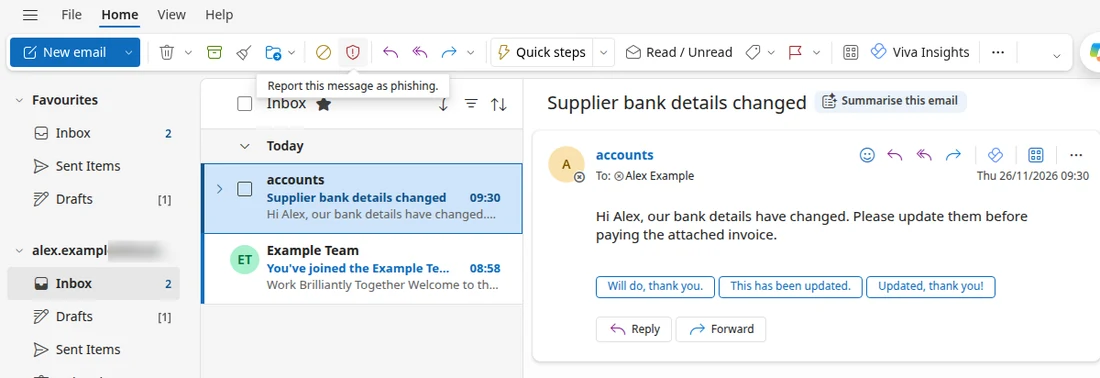
- The email leaves your inbox and Outlook confirms it.

- On your phone, open the email, tap the three dots, and choose the report option.
If you clicked a link or typed your password
Call us on 0118 359 2222 straight away. Tell us what you clicked and when. The sooner we know, the more we can do to protect your account.
If this doesn't work
- It asks you to change a supplier's bank details. Phone the supplier on a number you already have, not one in the email, before you change anything.
- It came from a colleague's address. Their account may have been taken over. Call us rather than replying to them.
- There is no Report phishing button. Forward nothing to colleagues. Email us a screenshot of the email instead.
Still stuck?
Call us on 0118 359 2222, or email [email protected] with a screenshot of the email. Do not forward the email itself to colleagues.