New Outlook and Outlook on the web
- Open Sent Items and open the email.
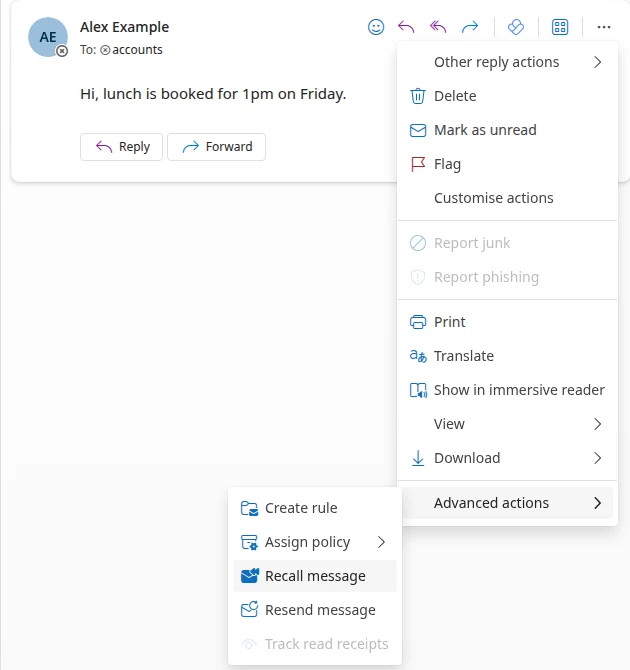
- Choose More message actions (the three dots), then Advanced actions, then Recall message.
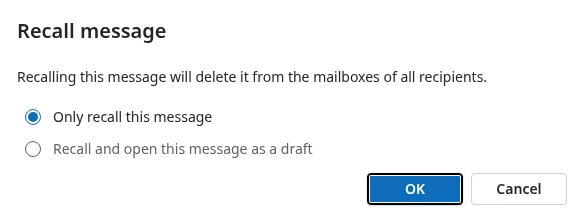
- Choose Only recall this message, or Recall and open this message as a draft to send a corrected version, then OK.
- Outlook emails you a report saying whether the recall worked for each person.
Classic Outlook (Windows)
- Open the email from Sent Items.
- Choose File, then Info, then Message Resend and Recall, then Recall This Message.
- Choose to delete unread copies, or to delete them and replace them with a new message, then OK.
If this doesn't work
- It went outside your organisation, or has been read. It cannot be recalled. Send a short follow-up asking the person to delete it.
- It contained personal or sensitive information. Tell us and your manager straight away. Sending personal data to the wrong person may need to be reported.
Still stuck?
Email [email protected] with the subject of the email, when you sent it and who to.