Do now: the first 15 minutes
- Reset the password. In the Microsoft Entra admin centre, go to Users, open the person, and choose Reset password. Give them the temporary password by phone, not by email.
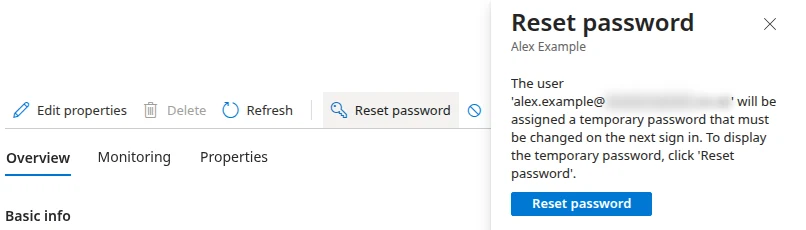
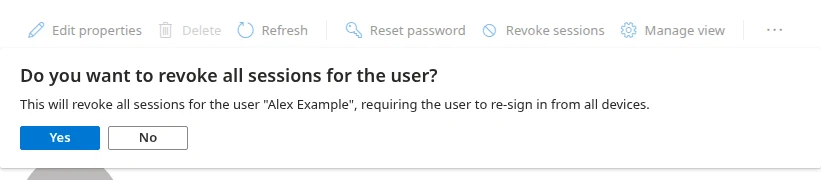
- Sign them out everywhere. On the same page, choose Revoke sessions, then Yes. A new password alone does not end a session the attacker already has open. Some apps can keep working for up to an hour after you revoke.
- Not sure yet? Block sign-in instead: Edit properties, untick Account enabled. You can turn it back on once you have checked.
- Warn people. Tell staff not to act on anything from that address today, and phone any customer or supplier who may have had an email from it.
In the first hour: close the doors they opened
- Remove sign-in methods they added. In Entra, open the user, then Authentication methods. Delete any phone, authenticator app or passkey the person does not recognise. Attackers add their own so they can get back in after a password reset.
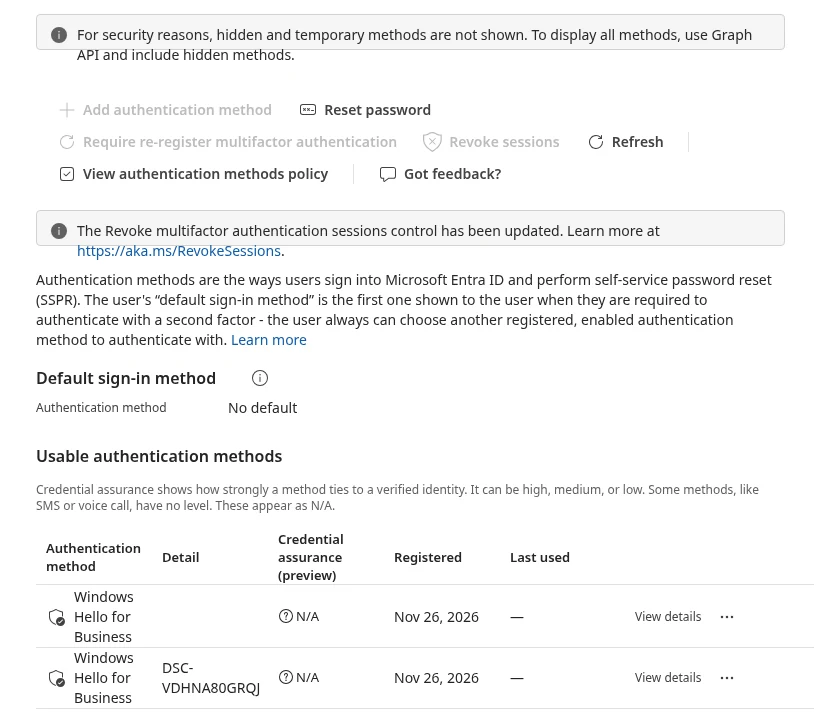
Check the registered date: a method added in the last few days that the person did not add is a strong sign of takeover. - Check for hidden mail rules. Attackers create rules that delete or move replies, so the person never sees a customer asking "did you really change your bank details?". In Outlook on the web, signed in as the person (or with the Exchange Online PowerShell command
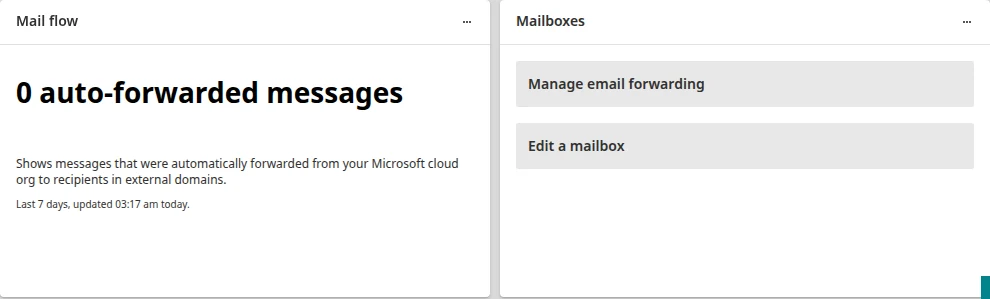
Get-InboxRule), open Settings, Mail, Rules, and remove anything they did not create. Rules that move mail to RSS Feeds, Archive or Deleted Items are typical. - Check for forwarding. In the Exchange admin centre, open the mailbox and check Email forwarding. The home page also shows how many messages were automatically forwarded outside the organisation in the last 7 days.
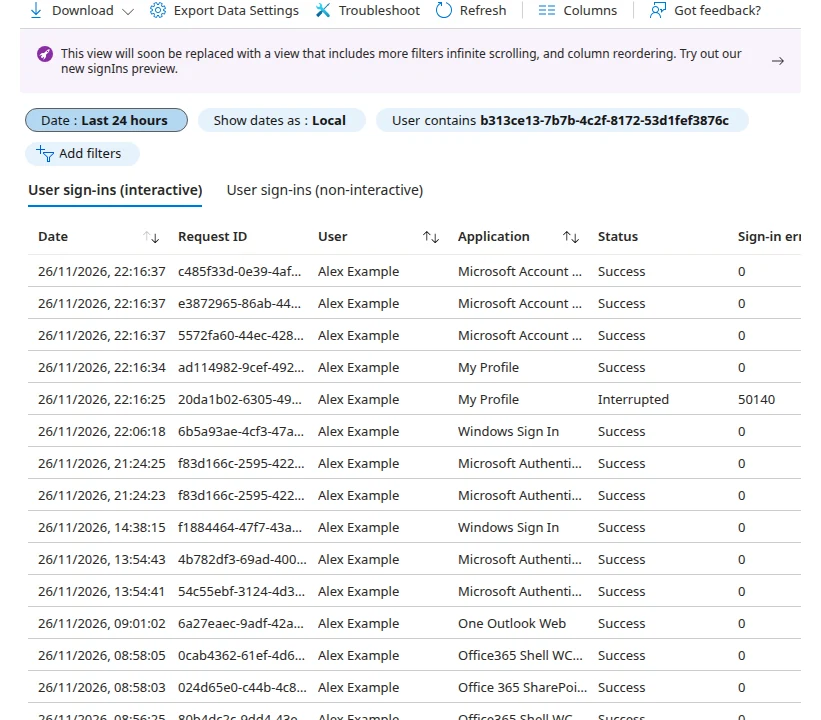
- See where they signed in from. In Entra, open the user, then Sign-in logs. Look for unfamiliar countries, times or apps, and write down the first suspicious sign-in: you will need the time later.
- Look for apps they connected. In Entra, open Enterprise apps and check for any application the person consented to recently that you do not recognise. A connected app can keep reading mail after the password changes. Remove its permissions.
- See what was sent. Check the person's Sent Items and Deleted Items for messages they did not write, especially anything about invoices, bank details or shared files. Those people need a phone call.
Today: report it and protect the money
- If a payment has been made or changed, call your bank immediately, then report it to Report Fraud. Speed matters: banks can sometimes recall a payment within hours. See our invoice fraud playbook.
- If the mailbox held personal data, such as customers' or staff details, decide whether this is a reportable personal data breach. If it is, the ICO needs to hear within 72 hours of you becoming aware. See our data breach playbook.
- Tell your insurer if you have cyber insurance, before you spend money on outside help.
- Check the person's other accounts. If they used the same password anywhere else, change it there too.
Who to tell
| Who | When | How |
|---|---|---|
| Your bank | Straight away, if money has gone or a payment is pending | The fraud number for your business account, from your card, statement or online banking. 159 also puts you through to your bank, but it is meant for personal accounts |
| Report Fraud (England, Wales, Northern Ireland) | Fraud or cyber crime. 24/7 line for organisations under attack | reportfraud.police.uk or 0300 123 2040. It replaced Action Fraud in January 2026 |
| Police Scotland | Fraud or cyber crime in Scotland | Call 101 |
| The ICO | Within 72 hours of becoming aware of a personal data breach that is likely to put people at risk. You can report in stages | ico.org.uk/report-a-breach or 0303 123 1113. See our data breach playbook |
| The NCSC | A significant cyber incident affecting your organisation | report.ncsc.gov.uk. Not sure where to report? gov.uk/report-cyber |
| Your insurer | As soon as you can, if you have cyber insurance. Many policies have a notification deadline and an incident line | The number in your policy |
Do not
- Delete the mailbox or the account. It is the evidence, and you will want the sign-in logs and messages.
- Change only the password. Revoke sessions and remove the attacker's sign-in methods too.
- Reply to emails in a thread the attacker joined. Phone the other person on a number you already have.
- Pay anything whose bank details changed by email, until you have checked by phone.
Afterwards: stop it happening again
- Stronger sign-in. Passkeys and other phishing-resistant MFA cannot be relayed by the phishing kits that cause most takeovers: phishing-resistant MFA in Microsoft 365.
- Conditional Access. Block sign-ins from countries you do not work in and old sign-in methods: a Conditional Access baseline.
- Email protection. Safe Links and Safe Attachments catch many phishing links before anyone clicks.
- Staff. Show everyone how to report a suspicious email.