

The short version
- Publish one SPF record listing every service that sends email for your domain.
- Turn on DKIM signing in the Microsoft Defender portal and publish its two CNAME records.
- Publish a DMARC record with
p=noneand a mailbox for reports. - Read the reports for a few weeks and fix any legitimate sender that fails.
- Move DMARC to
p=quarantine, then top=reject.
Google since February 2024, and Microsoft's Outlook.com since May 2025, require domains that send more than 5,000 messages a day to their users to publish all three. Yahoo has required the same of bulk senders since February 2024, without publishing a number. Smaller senders benefit as well: the records are what stop someone sending convincing invoices from your domain.
What each record does
| Record | Where it goes | What it tells a receiving server |
|---|---|---|
| SPF | A TXT record on your domain | Which servers are allowed to send email for the domain. |
| DKIM | Two CNAME records under _domainkey | Where to find the public key that checks each message's signature, proving it was not changed on the way. |
| DMARC | A TXT record at _dmarc on your domain | What to do with email that fails SPF and DKIM, and where to send reports. |
DMARC only passes when SPF or DKIM passes and matches the domain in the visible From address. That alignment is what makes it useful against spoofing.
Step 1: SPF
If Microsoft 365 is the only service sending email for your domain, the record is:
v=spf1 include:spf.protection.outlook.com -all
- One SPF record only. Two TXT records that both start
v=spf1make SPF fail. Add every sender to the same record. - Add your other senders. Invoicing, CRM, newsletter and website form services each publish the
include:they need. Find them before you tighten DMARC. - Stay under ten lookups. Each
include:counts towards a limit of ten DNS lookups. Past that, SPF fails.
Step 2: DKIM in the Defender portal
- Open the Microsoft Defender portal and go to Email & collaboration, Policies & rules, Threat policies, then Email authentication settings, and select the DKIM tab.
- Select your domain. The panel shows two Publish CNAMEs entries, for
selector1._domainkeyandselector2._domainkey.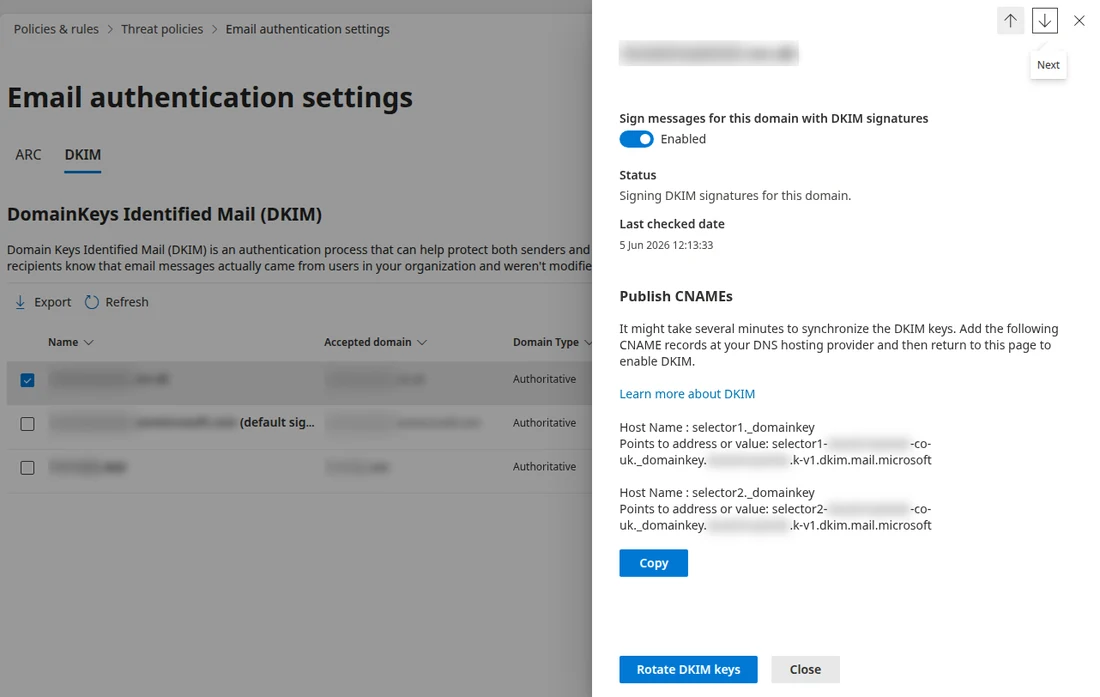
DSC's lab tenant. Domain names are blurred. - Create both CNAME records at your DNS host, copying the values exactly. Newer domains get values ending in
dkim.mail.microsoft; older ones may end inonmicrosoft.com. Use whatever the portal shows. - Wait for DNS to update, then turn on Sign messages for this domain with DKIM signatures.
Your onmicrosoft.com domain is signed automatically. That is not enough on its own: DMARC needs the signature to match your own domain.
Step 3: DMARC
Start in monitoring mode, with somewhere to receive reports:
v=DMARC1; p=none; rua=mailto:[email protected]
- Publish it as a TXT record at
_dmarc.yourdomain.co.uk. - Receivers send daily aggregate reports as zipped XML files. A DMARC reporting service turns them into a readable list of who sends as your domain, and whether they pass.
- Fix each legitimate sender that fails, usually by adding it to SPF or setting up DKIM in that service.
- When only unknown senders fail, change to
p=quarantine, which sends failing email to spam. A few weeks later, change top=reject, which blocks it.
Check your work
Our free Domain Health Check reads your SPF, DMARC and DKIM records and explains each result. It runs from public DNS, so it needs no sign-in.
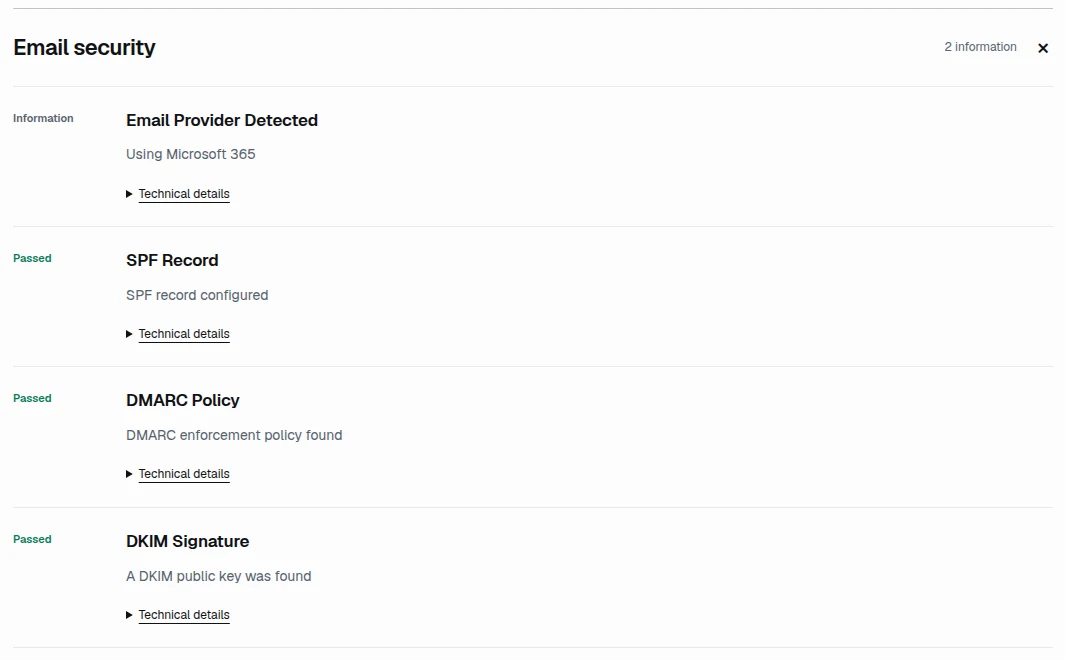
Then send an email to a Gmail address, open it, and choose Show original. SPF, DKIM and DMARC should each say PASS.
Common problems
- A service that sends as you starts failing. It is missing from SPF, or it signs with its own domain instead of yours. Most services offer DKIM for your domain: set it up there.
- Forwarded email fails SPF. Forwarding changes the sending server. DKIM usually survives forwarding, which is why both matter.
- Domains you own but do not use for email. Publish
v=spf1 -allandv=DMARC1; p=reject;so nobody can send as them. - Moving to reject too early. A forgotten payroll or invoicing service suddenly has its email blocked. Read the reports first.
Common questions
Should SPF end in -all or ~all?
Microsoft's own example ends in -all, which means anything not listed fails. Once DMARC is in place, receivers act on the DMARC result, so the difference matters less. Use -all once you are sure every sender is listed.
Do I still need SPF if DKIM is on?
Yes. DMARC passes if either one passes and matches your domain. Having both means email still passes when one breaks, for example when a message is forwarded.
How long should we stay on p=none?
Long enough to see every service that sends as you, usually a few weeks of reports. Then move to quarantine, check again, and move to reject.