

Cyber Essentials is a UK government-backed certification scheme, delivered by IASME (opens in new tab), that sets out five technical controls (opens in new tab) every organisation should have in place to defend against the most common internet-based attacks. Meeting all five is what the scheme requires. As a Cyber Essentials certification body, we assess businesses against these controls, so here is what each one asks of you.
Cyber Essentials checklist: what to gather first
- Applicant and scope: legal entities, locations, remote working and any proposed exclusions.
- Device inventory: owners, operating systems, versions and who manages each device.
- Software and cloud services: support status, update arrangements, service owners and authentication.
- Control checks: what actually operates across the scope, with dated facts from the responsible people.
- Actions: gaps, owners and dates, kept separate from completed work.
- Approval: the senior representative who will review and authorise the declaration.
The free DSC checklist and workbook helps organise those facts. The official IASME questionnaire is already free to preview in PDF or Excel. Get it directly from IASME and use the version applicable to your assessment account.
What is in Cyber Essentials scope?
Agree a clearly defined boundary with the certification body before assessment. It should cover the organisation’s IT infrastructure or a properly defined and separately managed subset. A scope that omits end-user devices is not acceptable. Cloud services holding or processing organisational data must be included under the current requirements.
Check remote working, personal devices and third-party access against the specific rules. For example, a phone used only for native calls, native texts or MFA has a defined exception; a personal device accessing work data is a different situation. The current NCSC requirements explain these boundaries. If CE is a prerequisite for DCC, also check its coverage against the applicable part of your DCC scope.
1. Firewalls
Protect the boundary of your network with firewalls. Every device that connects to the internet needs to sit behind a firewall, whether that is a dedicated boundary firewall on your network or the software firewall built into a laptop used away from the office. The requirement is that the firewall is switched on, its default administrative password has been changed, and it only allows the network services you need. Anything that is not required is blocked.
2. Secure configuration
Remove or disable unnecessary functionality, and change default passwords, so devices and software are not left in a weak default state. Computers, servers, phones and network devices ship with settings chosen for convenience rather than security. The requirement is to tighten them: delete or disable accounts and software you do not use, change or remove any default passwords, and turn off features you do not need. A device set up this way gives an attacker far less to work with.
3. User access control
Give people unique accounts with the least privilege they need to do their job, keep administrative rights tightly controlled, and enforce multi-factor authentication. Everyday work should happen in a standard user account, not an administrator one, and admin access should be granted only where it is needed and used only for admin tasks. Accounts should belong to real, named individuals, and multi-factor authentication adds a second check so a stolen password alone is not enough to get in.
4. Malware protection
Protect every in-scope device against malicious software. The requirement can be met in more than one way: run anti-malware software that is kept up to date, or restrict what can run on a device to an allow-list of approved applications. The permitted approach depends on the device and must be configured and maintained to meet the requirement. The point is that no device in scope is left with nothing standing between it and a malicious file or link.
5. Security update management
Apply security updates and vulnerability fixes within 14 days of release where the vendor rates the vulnerability critical or high risk, its CVSS v3 base score is at least 7, or the vendor provides no severity information. Keep in-scope software licensed and supported.
Those five controls are the whole of the standard, and none of them is exotic. Most businesses already do some of it and simply need to close the gaps. If you would rather have help meeting the controls, that is the sort of work our NCSC Assured Service Provider for Cyber Advisor team does, and for a sense of the outlay, see our guide to what Cyber Essentials costs.
Agree the scope before assessment. Include the required end-user devices and cloud services, plus personal devices that access organisational data or services. A phone used only for native calls, native texts or MFA is excluded under the scheme’s specific exception. Home routers supplied by the employee’s ISP are treated differently from routers supplied by the organisation. Record these boundaries with the certification body rather than assuming every personal device or home network is assessed in the same way. Backup is recommended but is not a sixth Cyber Essentials technical control.
What changed in April 2026
IASME uses the Danzell question set for purchases from 27 April 2026, aligned to NCSC requirements v3.3. The five control areas remain the same. Cloud services are explicitly in scope; cloud MFA and timely security updates need to be implemented, not merely planned. These are current requirements, rather than entirely new controls introduced in April. Use the IASME question set (opens in new tab) and NCSC requirements v3.3 (opens in new tab) for the assessment account you are using.
Cyber Essentials Plus requirements
The requirements for Cyber Essentials Plus, often written CE+, are exactly the same five controls. There is no additional control set to implement and no longer list to work through. Plus has its own technical test specification and assessment arrangements, which you should review alongside the common requirements.
What changes is how the controls are verified. Basic Cyber Essentials is a self-assessment that an appointed certification body reviews and verifies. Cyber Essentials Plus adds a technical audit, where an assessor tests a sample of your devices and accounts to confirm the controls work in practice rather than on paper.
Both levels require the controls to be met throughout the agreed scope. A verified self-assessment must describe the actual configuration accurately; it is not acceptable to claim a control that only works on some devices. Plus adds sampled technical verification and can reveal gaps the applicant did not identify. Our guide to preparing for Cyber Essentials Plus explains the checks.
Cyber Essentials certification comes before Plus. IASME says you do not need to repeat the self-assessment stage if Cyber Essentials was achieved less than three months before Plus certification. Agree the scope and dates of both assessments early; a general twelve-month CE validity period does not establish Plus eligibility on its own.
Do the requirements change for defence or MOD work?
The five controls do not change, but what you have to hold alongside them does. Every level of Defence Cyber Certification requires Cyber Essentials, and DCC Levels 2 and 3 require Cyber Essentials Plus as well. The MOD has asked all industry partners to achieve DCC Level 0 by 31 December 2026, and that request explicitly includes obtaining Cyber Essentials for all applicable business-critical systems in scope.
The requirement most often missed there is scope rather than controls: Cyber Essentials scope is set by you, contract scope is set by the contract, and the two are decided separately. DCC and Cyber Essentials covers how the two schemes fit together.
Getting certified against these requirements
We are an appointed Cyber Essentials certification body, so the assessment against these controls happens here rather than being passed to a third party. If you want to know where you stand before committing, the Cyber Essentials readiness checker is a five minute self check against the five controls, and Cyber Essentials certification sets out how the process runs.
What if our MSP manages IT, or staff use their own devices?
Ask the provider to identify the systems and tasks it manages, the information it can supply and anything outside its reports. Your organisation still needs accurate answers about the agreed scope. A managed-service contract alone does not establish that the requirements are met.
For personal devices and home working, record what accesses business data or services and check the applicable scope rules. Discuss specific exceptions with the certification body. Do not assume every personal device is excluded or that the office inventory is complete.
Cyber Essentials preparation checklist
A printable checklist and editable device, software, cloud service and action registers to organise your self-assessment.
ZIP: 4-page PDF checklist and Excel workbook
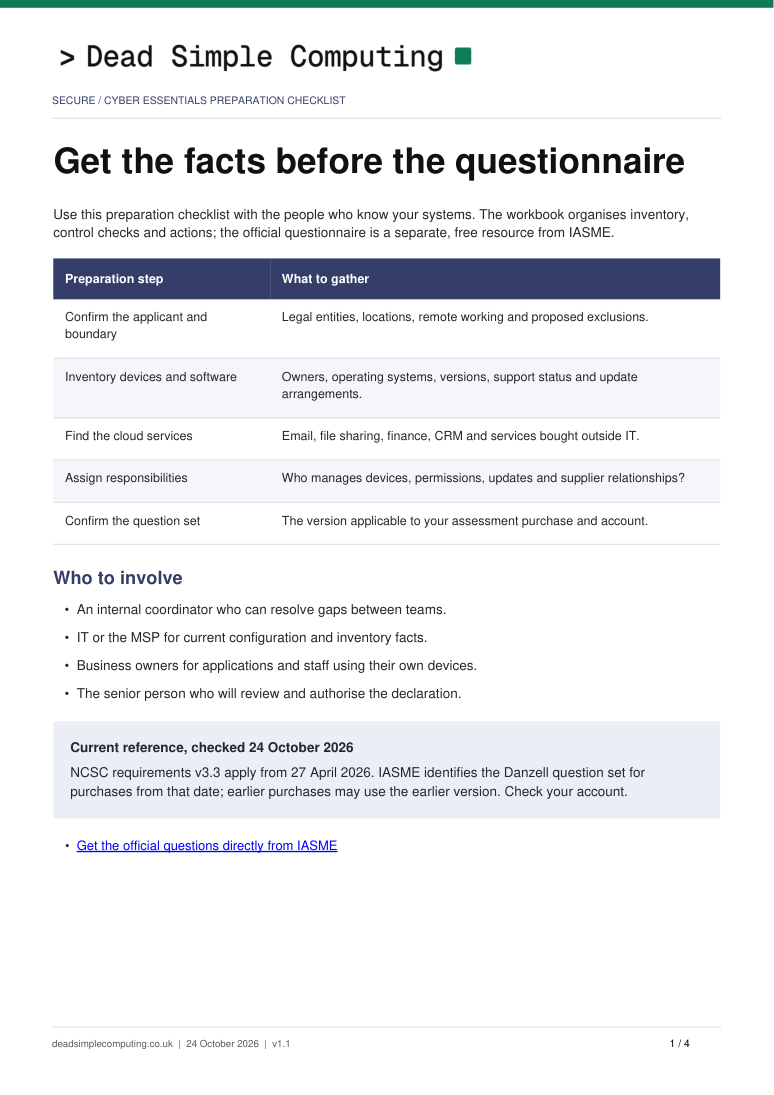 Preview the guide’s first page See the layout and contents before requesting it. Opens in a new tab.
Original DSC templates for you to complete. Use them alongside the official requirements; a completed template does not establish compliance.
Common questions
What are the five Cyber Essentials controls?
The five controls are firewalls, secure configuration, user access control, malware protection, and security update management. Together they set a baseline of technical measures that block the majority of common internet-based attacks, and an organisation must meet all five to be certified.
Do I need MFA for Cyber Essentials?
Yes. The current requirements call for MFA where available and require cloud authentication to use MFA. Inventory every cloud service and confirm how user and administrator access is protected. Resolve unavailable MFA and any special account arrangements with your certification body against the current question set.
How often must I patch for Cyber Essentials?
Apply security updates and vulnerability fixes within 14 days of release where the vendor rates the vulnerability critical or high risk, its CVSS v3 base score is at least 7, or the vendor provides no severity information. Keep in-scope software licensed and supported.
Is Cyber Essentials self-assessed?
Basic Cyber Essentials is a self-assessment that an appointed certification body reviews and verifies before certifying you. Cyber Essentials Plus covers the same five controls but adds an independent technical audit, so it is verified rather than self-declared.
What is the difference between Cyber Essentials and Cyber Essentials Plus?
Both cover the same five controls. Cyber Essentials is a verified self-assessment, while Cyber Essentials Plus adds a technical audit in which an assessor tests a sample of your devices and accounts to confirm the controls are in place. Plus carries more weight because it is independently checked.